Report Issuance
Once you have run the security scans, you need to turn the results into documents you can submit for GS certification or use for internal reporting. The [Report Issuance] tab on the [Security Analysis] page generates and downloads 8 types of GS certification security documents from your scan results.
Each document requires the scans of the security areas it needs (e.g. SAST, SCA, IaC) to be completed. If required scans are missing, the tab guides you to the relevant area tab; fill in the scan and issue the document again.
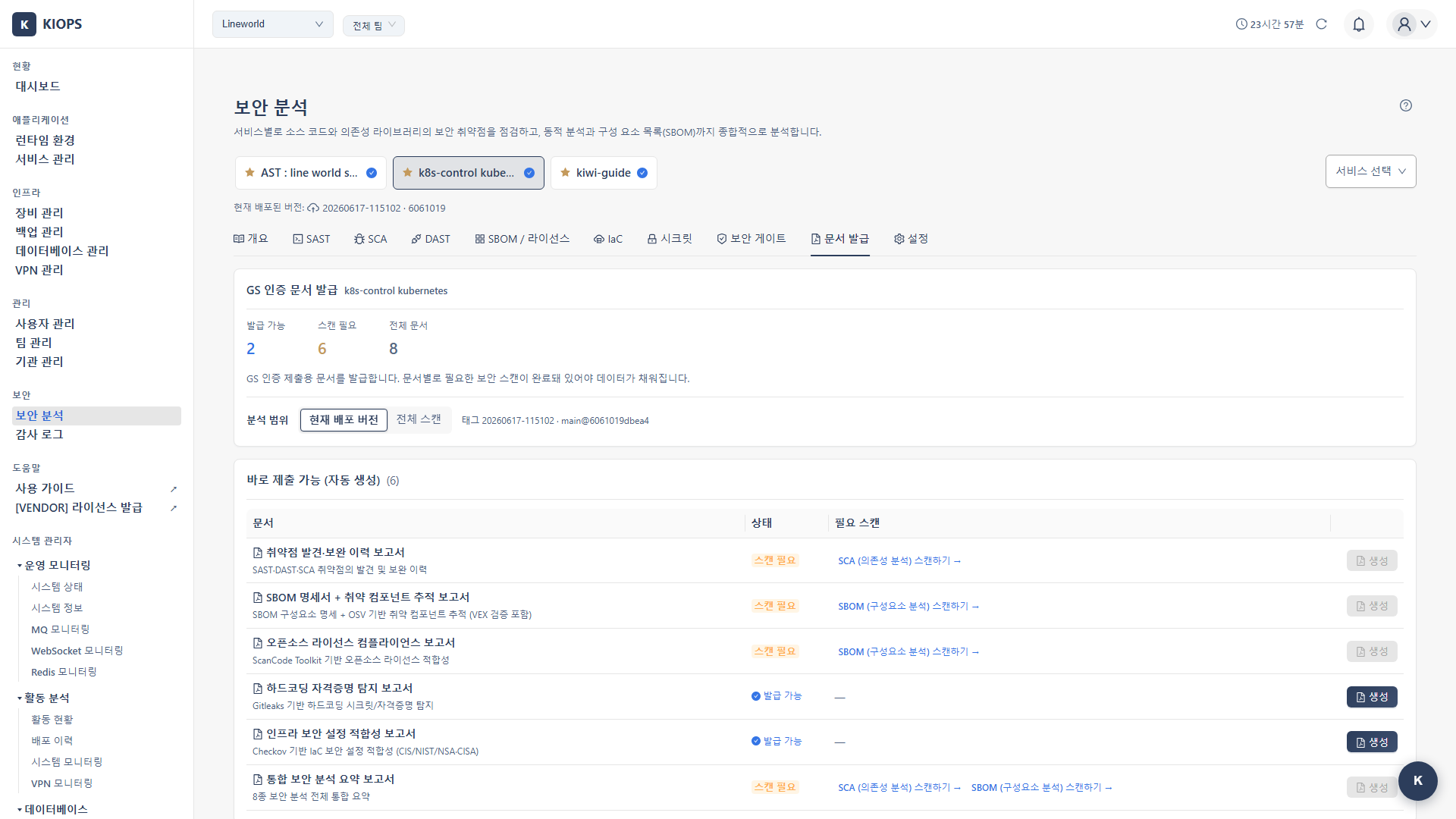
Where to issue
[Security Analysis] page → [Report Issuance] tab. Per-service deep link: /security?id={serviceId}&area=reports.
Documents (8 types)
The 6 automatic documents are generated directly from scan results; the 2 draft documents are provided as narrative drafts.
Automatic documents (6)
| Document | Content | Required scans |
|---|---|---|
| Vulnerability Discovery & Remediation History Report | Discovery and remediation history of SAST/DAST/SCA vulnerabilities | SAST · SCA (DAST if a domain exists) |
| SBOM Specification + Vulnerable Component Tracking Report | SBOM component specification + OSV-based vulnerable component tracking (with VEX verification) | SBOM |
| Open Source License Compliance Report | ScanCode Toolkit-based open source license compliance | SBOM |
| Hardcoded Credential Detection Report | Gitleaks-based hardcoded secret/credential detection | Secrets |
| Infrastructure Security Configuration Compliance Report | Checkov-based IaC security configuration compliance (CIS/NIST/NSA·CISA) | IaC |
| Integrated Security Analysis Summary Report | Integrated summary of all 8 security analyses | SAST·SCA·SBOM·IaC·Secrets·Gate (DAST if a domain exists) |
Draft documents (2)
| Document | Content | Required scans |
|---|---|---|
| Product Specification 2.6 Security Items | Narrative draft of Product Specification 2.6 security items | SAST·SCA·IaC·Secrets (DAST if a domain exists) |
| GS Test/Certification Pre-check Checklist | GS test/certification pre-check checklist based on the 8 analyses | SAST·SCA·SBOM·IaC·Secrets·Gate (DAST if a domain exists) |
DAST is conditional — DAST applies only to services that have an issued domain. For internal services without a domain, DAST is treated as "not applicable (N/A)" so that documents that require DAST conditionally can still be issued.
Issuance steps
- Select the target service on the [Security Analysis] page.
- Go to the [Report Issuance] tab.
- In the document list, check each document's status and whether its required scans are satisfied.
- If required scans are missing, go to the guided area tab and complete the scan first.
- Click the [Generate] button on a satisfied document to issue it, then download / re-download / delete it under Issued Document Management.
Documents are generated from existing scan results, so if code or images change, re-run the related scans and re-issue the document to reflect the latest state.